wEEK 1
This week, we will explore how operating systems like Linux power the technology we rely on every day.
Have you ever:
- Seen an error message you didn’t understand?
- Wondered why your computer slowed down after an update?
- Had to reboot something and hoped for the best?
These moments happen because we often use computers without understanding how they work underneath.
The knowledge about Operating Systems (OS) can help you understand this.
Why This Matters
We live in a digital world where computers run our work, school, communication—even our homes. Yet most people have never learned what actually makes a computer run.
That “invisible layer” is the operating system.
Learning how operating systems work helps you:
- Understand what’s happening when things go wrong
- Make smarter decisions about software and settings
- Use powerful tools that most people avoid (but professionals rely on)
- Develop confidence in troubleshooting and explaining technical issues
- And more!
What Is an Operating System?
An Operating System (OS) is the core software that manages the computer’s hardware and runs your apps.
What it does:
- Manages hardware (CPU, memory, disk, keyboard, screen)
- Runs applications (like browsers, editors, games)
- Provides an interface so you can interact with your system
Why it matters:
Without an OS, a computer is just metal and plastic—it can’t do anything. The OS turns it into a usable machine by handling every request, command, and click you make.
Did you know that Windows, macOS, and Linux are all operating systems?
There are many operating systems in use today, but most people are familiar with just a few:
- Windows is the most widely used desktop operating system, found on the majority of non-Apple laptops and desktops. As of May 2025, it holds about 70% of the desktop/laptop market share globally (Statcounter).
- macOS is Apple’s desktop operating system, used on MacBooks and iMacs. It holds around 10% of the global desktop/laptop market (Statcounter).
- Linux is a family of open-source operating systems. While only about 4% of personal computers use Linux, it’s the foundation of many critical systems, including servers, research labs, supercomputers, and Android devices.
The World Runs on Linux
In this course, we’ll be working with Linux, an open-source operating system known for being powerful, flexible, and widely used across many fields.
Even if you’ve never used Linux before, it’s likely already playing a role in your daily life—behind the scene.
Although only about 4% of personal computers run Linux (Statcounter, May 2025), its role in the global technology landscape is far greater:
- 100% of the top 500 supercomputers run Linux (TOP500 Supercomputer List, 2024)
- 96% of the top 1 million web servers use Linux (W3Techs)
- Android, the most widely used smartphone OS globally, is built on the Linux kernel (Statista, 2025: ~72% of smartphone market)
- Major cloud providers (AWS, Google Cloud, Azure) rely heavily on Linux-based systems
What the creator of Linux says
To understand why Linux became such a powerful and influential system, it helps to hear from the person who started it.
In this TED interview, Linus Torvalds, the creator of Linux, shares how a small personal project grew into the backbone of the internet, supercomputers, smartphones, and more.
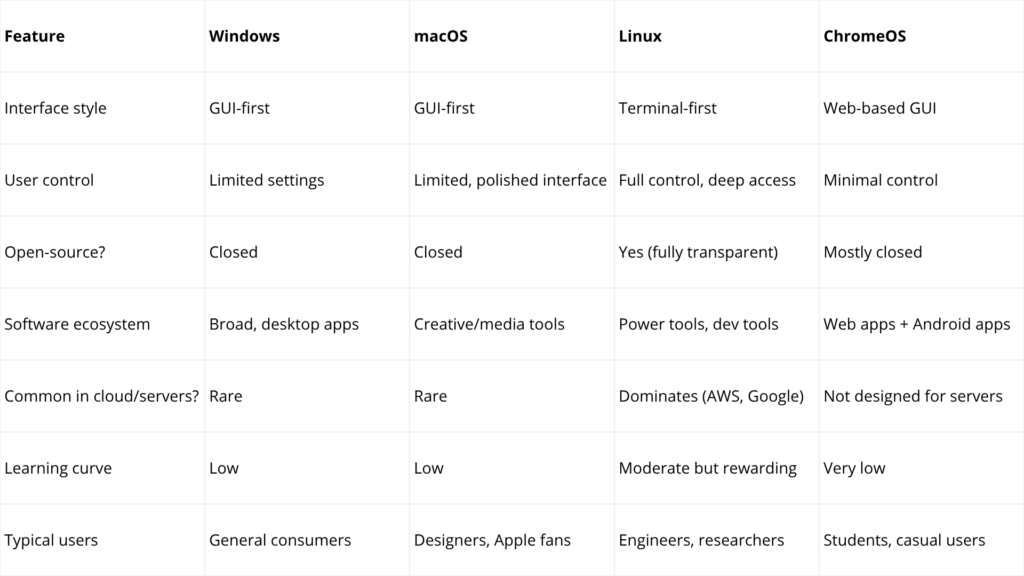
How Does Linux Compare to Other Operating Systems?
What are Linux & Linux Distribution?
What is Linux?
- Linux is the core part of an operating system, called the kernel.
- It helps the computer talk to hardware and run software.
- It’s free, fast, and widely used in servers, phones, and computers.
What is a Linux Distribution?
A Linux distribution (or “distro”) is a complete, ready-to-use Linux system that includes:
- The Linux kernel
- Essential tools and applications (web browser, file manager, software installer)
- A graphical interface (like a desktop environment)
In short: A Linux distribution = Linux + apps + desktop.
There are many different Linux distributions, and each one offers a unique mix of tools, desktop environments, and update styles.
Some are built for speed, some for stability, others for special uses (e.g., security, education, servers). You can learn more about this here.
For This Course, We Will Use: Debian-based Linux distribution.
This concludes Lecture 1. Please return to Blackboard to access the Week 1 materials.